Google Maps पर अपनी taxi service का नाम search करने पर business दिखाई नहीं देता? ऐसे में सबसे पहले यह check करना जरूरी है कि आपकी Google Business Profile बनी हुई है या नहीं। अगर profile पहले से मौजूद है, तो नई listing बनाने की जरूरत नहीं है।
Google Business Profile एक free tool है। इसकी मदद से eligible taxi owners Google Search और Maps पर अपना business name, phone number, services और दूसरी details manage कर सकते हैं। इसे पहले Google My Business कहा जाता था।
इस guide में आप सीखेंगे कि Google Business Profile setup कैसे करें, सही category और location कैसे चुनें और verification तक कैसे पहुंचें। Steps ऐसे रखे हैं कि आप mobile पर भी follow कर सकें।
Google Maps पर Taxi Business कैसे Add करें? — सीधा जवाब
Google Business Profile के setup page पर जाएं, अपने Google Account से sign in करें, Add your business to Google चुनें और business की सही details भरें। इसके बाद Google जो verification option दिखाए, उसे complete करें। अगर listing पहले से है, तो उसे Claim (मौजूदा listing को अपने account से manage करना) करें, duplicate profile न बनाएं।
इस process को कई लोग Google Maps business registration भी कहते हैं। Google पर business profile बनाना free है।
शुरुआत से पहले क्या तैयार रखें?
Profile बनाते समय ये details काम आएंगी:
- Business name: वही नाम जिससे आपकी taxi service असल में चलती है।
- Phone number: Active number जिस पर customers call कर सकें।
- Location: आपका real business address या service area की सही जानकारी।
- Taxi services: जो routes और pickup services आप वास्तव में देते हैं।
- Google Account: ऐसा account जिसका control business owner के पास हो।
Practical tip: Documents या verification के लिए मांगी गई information हमेशा business की वास्तविक details से match होनी चाहिए।
Step 1: पहले Check करें कि आपकी Taxi Listing पहले से मौजूद तो नहीं
Google Maps खोलें और अपना business name + city search करें।
Example: आपका business name Hill View Taxi Service है, तो Hill View Taxi Service Shimla search करें। यह केवल sample name है।
Search result के अनुसार अगला step चुनें:
- Listing नहीं मिल रही: Google Business Profile पर नई listing बनाने की process शुरू करें।
- Listing मिल गई, लेकिन आपके control में नहीं है: Profile पर उपलब्ध Claim this business → Manage now option देखें।
- किसी दूसरे account ने profile verify की है: Google की ownership request process follow करें।
ध्यान दें: सिर्फ business ऊपर नहीं दिख रहा, इसका मतलब हमेशा यह नहीं कि नई listing बनानी चाहिए। पहले नाम से search करके existing profile check करें।
Step 2: Google Business Profile Setup शुरू करें
अब Google Business Profile setup खोलें। इसके बाद:
- अपने Google Account से sign in करें।
- Add your business to Google पर click करें।
- अपना सही business name डालें।
- Google के बताए अगले steps में category, location और contact details भरें।
- Screen पर दिए instructions के अनुसार आगे बढ़ें।
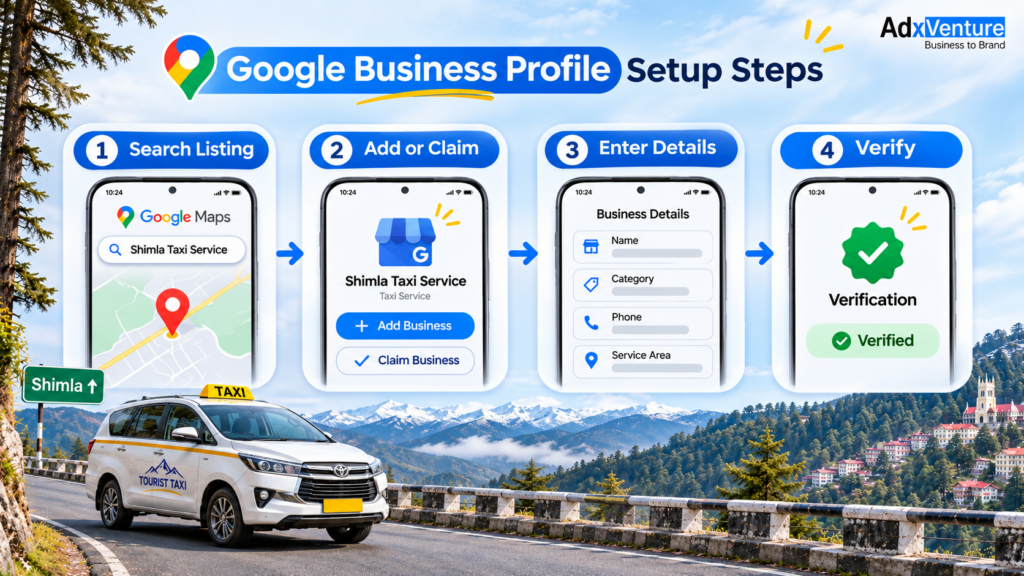
अगर आप Google पर “set up google business” या “set up google business profile” search करके यहां पहुंचे हैं, तो ऊपर बताए गए steps follow कर सकते हैं। Taxi owners के लिए भी Business Profile बनाने की basic process यही है।
पुराने tutorials में आपको “google my business set up” लिखा मिल सकता है। यह Google Business Profile का पुराना नाम है।
Step 3: Business Name और Category सही भरें
Business Name में अपना real नाम लिखें। सिर्फ search में आने के लिए Best Taxi Service Shimla या Cheapest Cab जैसे extra words न जोड़ें, जब तक वे आपके business name का वास्तविक हिस्सा न हों।
फिर Primary Category (business का मुख्य काम बताने वाली category) चुनें। यदि Google के options में Taxi service उपलब्ध है और वही आपका main काम है, तो यह relevant category हो सकती है।
Example: अगर आप Dzire, Innova और दूसरे vehicles से tourist pickup और sightseeing trips देते हैं, तो अपनी मुख्य service के हिसाब से category चुनें। हर अलग route के नाम पर नई business listing बनाने की जरूरत नहीं है।
Step 4: Office नहीं है तो Address और Service Area कैसे भरें?
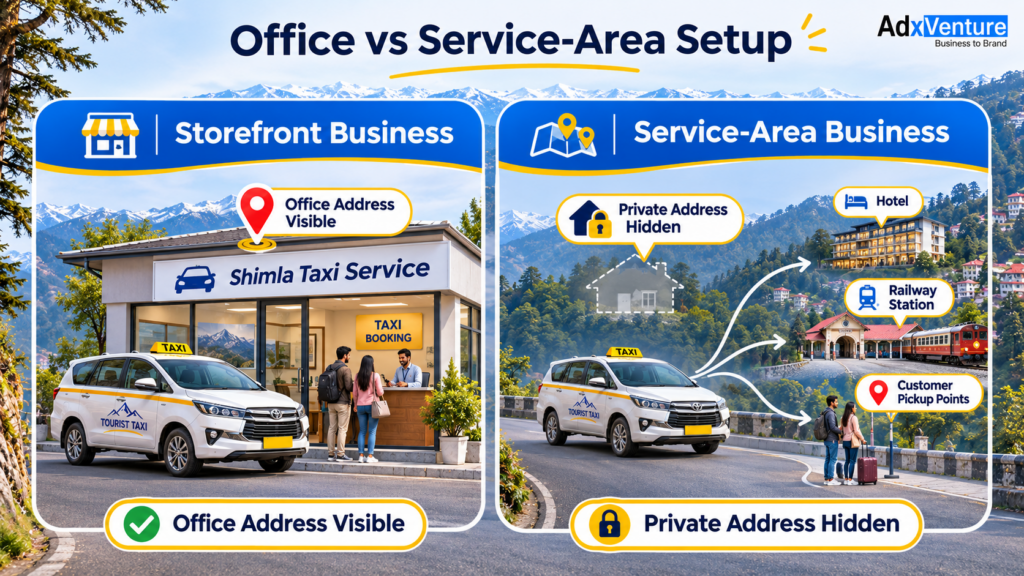
कई taxi drivers और owners customers को hotel, railway station या तय pickup point से collect करते हैं। ऐसे eligible businesses के लिए Service-Area Business (ऐसा business जो customer की location पर जाकर service देता है) का option हो सकता है।
यहां दो बातें समझें:
- Customers आपके office पर आते हैं: अगर location Google की requirements पूरी करती है, तो real business address दिखाया जा सकता है।
- Customers आपके address पर नहीं आते: Eligible service-area business के तौर पर सही setup करें और private address को public profile पर न दिखाएं।.
Service area में वही इलाके चुनें जहां आप वास्तव में service देते हैं।
सिर्फ Google Maps पर दिखने के लिए Mall Road, taxi stand या किसी और का fake office address न डालें। Google की Business Profile guidelines में address और service-area के rules समझाए गए हैं।
Step 5: Phone Number, Timing और Taxi Services Add करें
अब अपना working mobile number भरें। अगर tourist आपको call ही नहीं कर पा रहा, तो listing पर दिखाई देने का फायदा कम हो जाएगा।
Business hours में वही समय रखें जब customers आपकी team से बात कर सकते हैं। केवल तभी 24×7 available लिखें जब आपकी service वास्तव में उस समय उपलब्ध हो।
Services में specific जानकारी दें, जैसे:
- Shimla local sightseeing
- Kufri pickup और drop
- Railway station pickup
- Chandigarh–Shimla taxi transfer, अगर आप यह route चलाते हैं
यह केवल Example है। अपनी actual taxi services के हिसाब से details add करें। इससे customer को पता चलेगा कि उसकी trip के लिए आपसे contact करना सही रहेगा या नहीं।
Step 6: Real Taxi Photos और Website Link जोड़ें
अपनी available गाड़ियों की साफ photos लगाएं। Exterior, interior, seating और luggage space दिखाने वाली photos customer की मदद कर सकती हैं। ऐसी car की photo न लगाएं जो आपकी fleet में है ही नहीं।
अगर आपकी website है, तो उसका link profile में add करें। Website पर customer vehicle options, routes, pickup details और booking enquiry का तरीका एक जगह देख सकता है। Google Business Profile बनाने के लिए website जरूरी नहीं है, लेकिन direct enquiries के लिए useful हो सकती है।
अपनी Taxi Service के लिए Website भी चाहिए?
अगर customers Google Maps पर आपकी taxi खोजने के बाद routes, गाड़ियां और contact details एक जगह देख सकें, तो enquiry करना उनके लिए आसान हो सकता है।

Adxventure का Basic Website Package ₹7,999 (one-time) है। Package की details और आपकी जरूरत के मुताबिक website options देखने के लिए Taxi Website Development Service देखें।
पहली Consultation बिल्कुल FREE है। Website के बारे में पूछने के लिए +91 9149214580 पर Call करें।
Step 7: Google Business Profile का Verification Complete करें
Details भरने के बाद Google profile के लिए verification option दिखाएगा। Business के अनुसार video, phone/SMS, email या दूसरा available method मिल सकता है। कौन-सा method मिलेगा, यह Google तय करता है।
अगर video verification दिखाई दे, तो on-screen instructions ध्यान से follow करें। Google आपसे business की location, इस्तेमाल होने वाले equipment या business manage करने का proof दिखाने को कह सकता है। Private documents और sensitive information बिना जरूरत share न करें।
Verification submit करने के बाद profile में status check करते रहें। अगर verification में problem आए, तो Google की verification help देखें। Verification fail हो, तो profile पर दिख रहा error check करें और उसी के हिसाब से correction करें।
Google Maps पर Profile बनने के बाद ये 6 Checks जरूर करें
Setup और verification के बाद अपने business की public information review करें:
- Business name और category सही दिखाई दे रहे हैं?
- Phone number पर call लग रही है?
- Address या service area ठीक है?
- Available services updated हैं?
- Real taxi photos और website link सही हैं?
- Profile का verification status क्या दिखा रहा है?
अगला step: Listing बन जाने के बाद उसे customers के लिए useful रखना भी जरूरी है। अगर आप जानना चाहते हैं कि Google Maps पर ranking कैसे काम करती है और customer calls बढ़ाने के लिए क्या सुधार सकते हैं, तो इसे Local SEO for Taxi Business guide में detail से समझ सकते हैं।
ये 5 गलतियां Google Maps Listing बनाते समय Avoid करें
- एक ही taxi business की कई duplicate profiles बनाना।
- Business name में ranking के लिए extra keywords जोड़ना।
- Fake office address या गलत service area दिखाना।
- बंद phone number या unavailable vehicles की जानकारी देना।
- Google Account का password या verification code किसी अनजान व्यक्ति को देना।
Quick check: Business name, location और phone number आपकी real-world business information से match कर रहे हैं, तो आपने एक जरूरी शुरुआत सही की है।
Frequently Asked Questions
1. Google Maps पर Taxi Service कैसे Add करें?
Google Business Profile खोलें, business की सही details भरें और Google के दिए verification steps follow करें। पहले check कर लें कि उसी नाम से कोई listing पहले से बनी तो नहीं है।
2. क्या Google Business Profile बनाना Free है?
हाँ। Eligible business के लिए Google Business Profile add या claim करना free है। किसी agency से setup में professional help लेना अलग service हो सकती है।
3. क्या Taxi Driver बिना Office के Google Maps पर आ सकता है?
अगर business Google की eligibility पूरी करता है और customers को उनकी location पर service देता है, तो service-area setup संभव हो सकता है। ऐसा business अपना private address public नहीं दिखाता।
4. Taxi Business के लिए कौन-सी Category चुनें?
Google के available options में से अपनी main service से match करने वाली category चुनें। Taxi service relevant हो सकती है, अगर वही आपका वास्तविक काम है।
5. अगर Google Maps पर मेरी Listing पहले से है तो क्या करूं?
नई listing बनाने से पहले existing profile claim करने का option check करें। किसी और account से verified profile हो, तो ownership request process follow करें।
6. Google Business Profile Verify होने में कितना Time लगता है?
Verification का समय method और Google की review process पर depend करता है। Profile पर दिखने वाला status follow करें और जरूरत पड़ने पर Google की verification help देखें।
7. क्या Listing बनते ही Taxi Bookings मिलने लगेंगी?
Listing बनने से customers आपके business की जानकारी देख सकते हैं, लेकिन calls और bookings अपने आप नहीं आतीं। सही contact details, relevant services, customer demand और competition भी मायने रखते हैं।
Conclusion: अब अपनी Taxi Service Google Maps पर Add करें
Google Maps पर अपना taxi business add करने के लिए पहले existing listing check करें, फिर सही business name, category, location, phone number और services भरें। Google की verification process complete करें और समय-समय पर information update करते रहें।
अगर category, address या service-area setup को लेकर confusion है, तो Adxventure Team से अपनी taxi business की जरूरत discuss कर सकते हैं। हम आपको सही setup options समझने में मदद करेंगे।
पहली Consultation बिल्कुल FREE है। Call करें: +91 9149214580